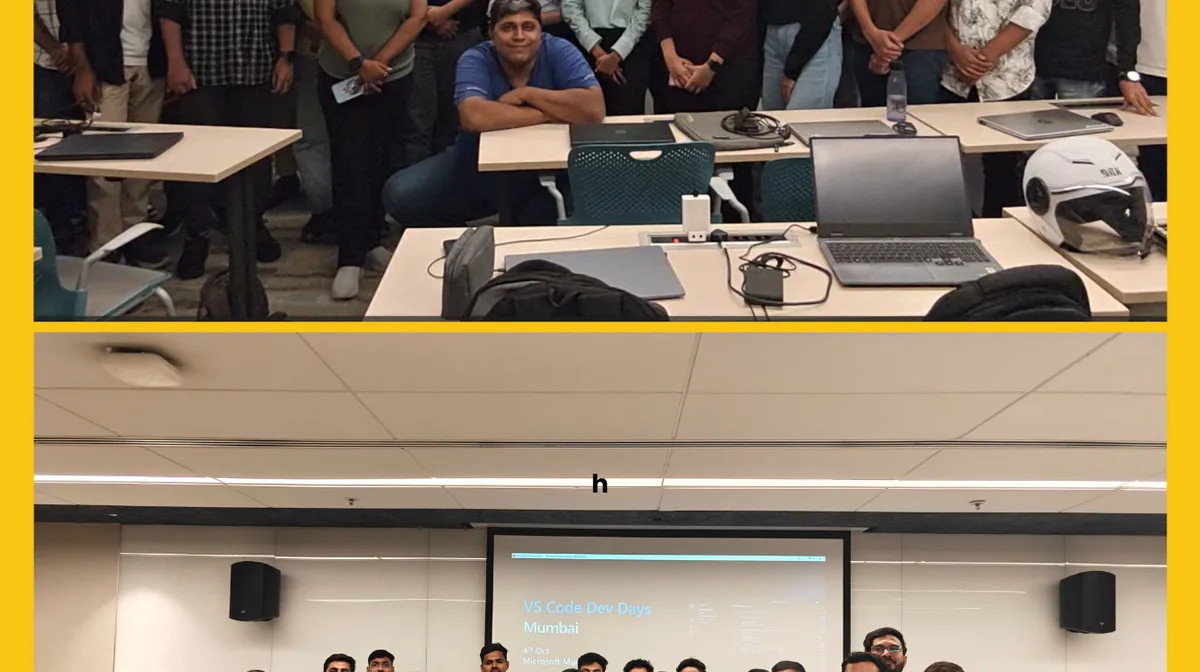
Mumbai showed up early, caffeinated, and curious. With gates opening at 8:30 AM and two packed batches across the day, VS Code Dev Day Mumbai brought together developers for a hands-on deep dive into the latest and greatest in developer productivity. From the morning momentum of Batch A to the afternoon energy of Batch B, the day was a celebration of how tools like VS Code, GitHub Copilot, and the newly released Copilot CLI are reshaping the way developers build, debug, and ship: faster and smarter than ever.
Kamal flew in from Bengaluru to deliver the opening keynote, setting a thoughtful and energizing tone for the day. Through personal anecdotes and real-world reflections, she illustrated how VS Code and GitHub Copilot aren’t just tools: they’re creative partners in the developer journey. From debugging to ideation, Kamal showed how these technologies enhance not just productivity, but the joy of building itself. Each batch agenda was intentionally designed as a three-act play:

- Act I opened with Kamal’s whirlwind tour of the essentials, grounding attendees in the possibilities of AI-assisted development.
- Act II was my hands-on workshop, built around the Pets Workshop, focused on establishing a strong baseline for using VS Code and GitHub Copilot efficiently. This session helped attendees streamline their coding workflows and build a real-world full-stack app — setting the technical foundation for what came next.
- Act III built on that baseline, reaching an apogee of productivity by showcasing how the broader Copilot ecosystem including Copilot CLI, Speckit, Awesome Copilot repo etc, can be orchestrated to explode a developer’s output across the stack.
Act II : Hands-on Workshop
The Pets Workshop is a focused, one‑hour hands‑on lab by GitHub that guides developers through cloning and running a small full‑stack app (Python/Flask backend + Astro/svelte frontend)
-
During the first setup step, a few attendees ran into issues running the local scripts — which was an ideal opportunity for me to introduce them to GitHub Codespaces. I demonstrated how it instantly launches a fully configured development environment in the cloud, eliminating local setup friction and environment mismatches. Within seconds, participants were coding in a pre-provisioned workspace, bypassing installation hurdles and diving straight into the workshop.
-
One of the key ideas I wanted attendees to walk away with was this: AI-assisted development marks a fundamental shift from deterministic coding to probabilistic collaboration. Traditional programming relies on precise, step-by-step instructions — deterministic inputs that yield predictable outputs. But with tools like GitHub Copilot and Copilot CLI, developers now engage with large language models (LLMs) that respond to natural language prompts, interpret intent, and offer suggestions based on probability, context, and learned patterns. This shift means we’re no longer just writing code — we’re co-creating with an intelligent agent that can surprise us, accelerate us, and even challenge our assumptions.
This paradigm shift was brought home vividly for participants during the first chapter of the workshop — “Add the Endpoints.” I asked attendees to share screenshots of their completions for the breed route, and while most received a correct GET verb from Copilot, a few were served a POST. Just one word of difference — but in the realm of REST APIs, it’s a world of semantic and functional divergence. This moment perfectly illustrated the probabilistic nature of AI-assisted development: Copilot doesn’t just follow instructions, it interprets intent. And unless the prompt is precise, the model may offer plausible but contextually incorrect — suggestions.

-
The Explore Project exercise showed attendees how to give GitHub Copilot the right project context by using the @workspace participant to index the repo, asking targeted natural‑language questions to surface files and dependencies, and clearing unrelated tabs to avoid noisy local context. With descriptive, repo‑aware prompts participants quickly located the database, found the files that list dogs, and identified where to add new routes — turning unfamiliar stacks (Python and Svelte/Astro) into approachable codebases within minutes. Recent model changes — larger context windows, stronger repository grounding, and improved prompt-following — noticeably improved the quality and relevance of replies, so precise prompts produced higher‑quality outputs, cut the number of edit iterations, and reduced token usage, saving both time and money for developers in resource‑constrained environments.

-
In the “Add the Filter Feature” chapter I used the moment to spark a discussion about model selection(a perenially hot topic) and demonstrate GitHub’s new auto model picker: showing how Copilot Edits and Copilot Chat can automatically choose the best available model to balance latency, capability, and rate‑limit behavior, while still letting users override the choice when needed; this practical demo made it easy to explain when a higher‑capacity model helps with complex multi‑file edits and when the auto picker will favor efficiency or availability, letting attendees focus on intent and prompts rather than model logistics.
-
Although marked as bonus content, I made completing the filter feature a clear goal, and I’m proud that attendees in Mumbai across both batches finished it. That outcome felt especially fitting: 2025 is already shaping up to be the year of agents, and finishing a bonus task showed participants could confidently combine intent, model selection, and tooling to ship a small but meaningful feature end-to-end. Completing the bonus reinforced the workshop’s core message: with the right prompts, workflows, and emerging agent-capabilities, developers can move from exploration to production-ready outcomes in a single session.
Act III: The Crescendo — Agents, Ecosystems, and Community
Building on Kamal’s keynote and the foundational Pets Workshop, the final session was designed to reach a crescendo — not just in tooling, but in mindset. Kamal touched about the accelerating pace of AI in MRI and its transformative potential, and that gave me the perfect segue to introduce attendees to the Azure AI Foundry Discord, a vibrant space where I’ve been chronicling my own journey through AI/ML.

A Personal Milestone, Rediscovered with Copilot
As VS Code crossed the landmark of 50 million downloads, I couldn’t help but reflect on my own journey with it. That moment sparked a question: When did I first use VS Code? Instead of digging through old emails or vague memories, I turned to GitHub Copilot — and asked it to help me trace my earliest commit in a repo I remembered working on. Sure enough, it surfaced a timestamp from January 30, 2017, tucked inside a .vscode/settings.json file. That tiny breadcrumb became a full-circle moment: from my first steps in VS Code to now helping 300+ developers unlock its full potential with AI. It was poetic: using an AI agent to rediscover the origin of my coding journey, while standing in front of a room full of developers learning to shape their own.

Wonderland of AI Assisted Coding: Awesome Copilot
I wanted to equip the attendees with a clear path forward. That’s where I introduced them to the Awesome Copilot repository: a treasure trove of community-curated prompts, chat modes, and instructions that supercharge GitHub Copilot beyond autocomplete. It’s not just a list — it’s a launchpad for building your own AI workflows.
The low-hanging fruit? Documentation. The Pets Workshop repo is sparse in its README and inline comments, which made it the perfect candidate to showcase how Copilot can generate structured, context-aware documentation using advanced prompting techniques from the Awesome Copilot repo. By leveraging prompts like “create-readme” etc attendees saw how they could instantly generate comprehensive documentation that not only described what the code does, but also why certain decisions were made: all tailored to the specific context of their project.

And here’s the kicker: in agent mode, VS Code treats .prompt.md files as executable. VS Code treats prompt files (filename suffix .prompt.md) as executable prompt artifacts and displays a small arrow/play icon in the editor gutter and tab to indicate they can be run directly in Copilot Chat as slash commands, enabling workflows like /create-readme or /run-tests without leaving the editor. Or you can invoke them directly using slash commands like /awesome-copilot create-readme, turning static prompts into dynamic, reusable tools. - This resonated strongly with attendees exploring reproducible workflows and agentic development.
Further, I dived into when to use Prompt files (.prompt.md) which are reusable, structured instructions saved as markdown that can be executed directly in VS Code — ideal for repeatable tasks like generating READMEs, refactoring code, or onboarding contributors. Chat modes, which Burke made famous with his Beast mode, on the other hand, customize Copilot’s behavior dynamically (e.g., “Explain like I’m new to Python” or “Be concise and formal”) and are best used when you want Copilot to adapt its tone, depth, or role in real-time. Use prompt files for workflow automation, and chat modes for interactive guidance and persona-driven responses.

Show me the numbers
A new experimental setting, aistat, landed in the VS Code Copilot which displays your AI Usage statics. Once enabled, it shows how much code in the file was yours own versus those generated by AI; also a count of completions.

Agents Everwhere
During the workshop, I had asked attendees to check out our community site and log any issues they find. One participant did just that, and I was able to demonstrate how I assigned the issue to Copilot and the Github Copilot Coding Agent went to work on it in the background, while I proceeded to showcase Visual vibe coding.

It was a valuable teachable moment to show attendees that helping Copilot starts with helping yourself — by writing clear, detailed issue descriptions. The more explicit the context, the better the agent can interpret intent and generate relevant, high-quality fixes. In agentic workflows, precision isn’t optional — it’s the fuel that powers meaningful outcomes.
The question I got posed was when to use GitHub Copilot Coding Agent versus Agent Mode in Visual Studio. The Copilot Coding Agent is ideal for background tasks that can run asynchronously, like triaging issues, generating boilerplate code, or refactoring large codebases. It works best when you can provide clear, detailed instructions upfront and let the agent operate independently. Agent Mode in VS Code, on the other hand, is more interactive and suited for scenarios where you need real-time collaboration, iterative feedback, or complex multi-step workflows that require your active involvement. Thats where the previously less popular “Simple Browser” mode shines, as it allows you to provide more context by a mere click.
Use the Coding Agent for autonomous tasks and Agent Mode for dynamic, hands-on development especially for UX/visual features. But with a caveat: ensure you have robust tests in place; Playwright MCP is your friend here.
Another consideration is deciding when to use Coding Agent versus Agent Mode to conserve premium-request quotas. Since each Coding Agent task consumes one premium request, I often avoid using it on my open-source work. Case in point: Scott Hanselman’s newly launched GitHub project, where I opted for Agent Mode and use local models to keep my premium requests in reserve.

AI in the Terminal
I introduced the terminal side of the trend by demonstrating Copilot CLI [I just love that banner 😊] for quick, conversational coding and shell workflow followed by Speckit to bring structure to the “vibe coding” wild west by turning ad‑hoc prompts, commands, and runbooks into shareable, versioned specs that are executable and reviewable; a detailed post chronicling our Speckit experience — setup, example specs from the workshop, versioning and execution, CI integrations, and practical recommendations — will follow.
Finale: Unleash your productivity
Remember that 10x developer meme that was popular a few years ago? With the July 2025 VS Code release (v1.103), it’s suddenly a lot less mythical. The update quietly introduced full Git worktree support: now you can spin up a separate VS Code window for each worktree, each powered by its own Copilot agent. That means parallel branches, parallel agents, and parallel productivity. It’s not just multitasking - it’s multi-agenting.
PS:
In the end, we had a Copilot Pro+ license to raffle out. We were short of time. Used GitHub Spark to spin out a quick web app to scaffold out a raffle app while we went to the cafeteria to grab our well deserved snacks after a long day of coding.
Congratulations, Jeff Rodrigues.

PPS: How successful was VS Code Dev Day - Mumbai? Lets just say I was not at all irked by this Sunday notification on my GitHub Mobile. #OSS #FTW. Keep hacking.